No App Store Needed
The Lilu Casino PWA installs directly from lilu-casino.com to your home screen on Android and iOS without passing through Google Play or the App Store.
Lilu Casino on Mobile
Install our PWA on Android or iOS and carry the full casino lobby, live tables from Evolution Gaming, and the sportsbook in your pocket - no app store required.
How to Install the Lilu Casino PWA
Why Play on Mobile at Lilu
No App Store Needed
The Lilu Casino PWA installs directly from lilu-casino.com to your home screen on Android and iOS without passing through Google Play or the App Store.
Instant Load
The PWA caches essential assets on your device, reducing load times for slots from BGaming and Pragmatic Play and live streams from Evolution Gaming.
TLS-Secured Sessions
Every mobile session uses the same TLS encryption as the desktop version, protecting your login credentials and payment data at all times.
Your Full Casino in a Browser Shortcut
Install our PWA on Android or iOS and carry the full casino lobby, live tables from Evolution Gaming, and the sportsbook in your pocket - no app store required.
Open on Mobile Gambling involves risk and may be addictive. You must be 18 or older to play. Bonus terms and conditions apply.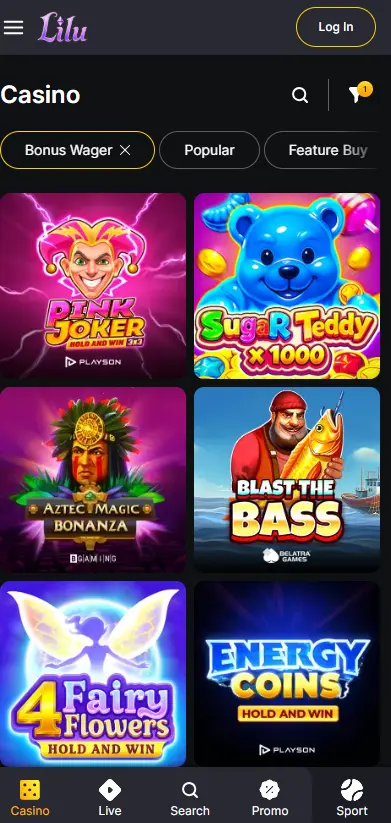
Mobile Security Best Practices
What you should do
What to avoid
Mobile Experience: Strengths and Limits
Pros
Cons
Device Compatibility
Android
iOS
The Lilu Casino mobile experience delivers the complete casino lobby through a Progressive Web App (PWA) that runs inside your mobile browser and can be pinned to your home screen. Every section available on desktop is accessible on mobile: slots from BGaming, Pragmatic Play, Play’n GO, NetEnt, and a dozen additional studios; the full Evolution Gaming and Ezugi live dealer floor including Lightning Roulette, Crazy Time, and Andar Bahar; the sportsbook with live betting; your active bonus stages; and all deposit and withdrawal methods including Bitcoin, Ethereum, and Tether (USDT).
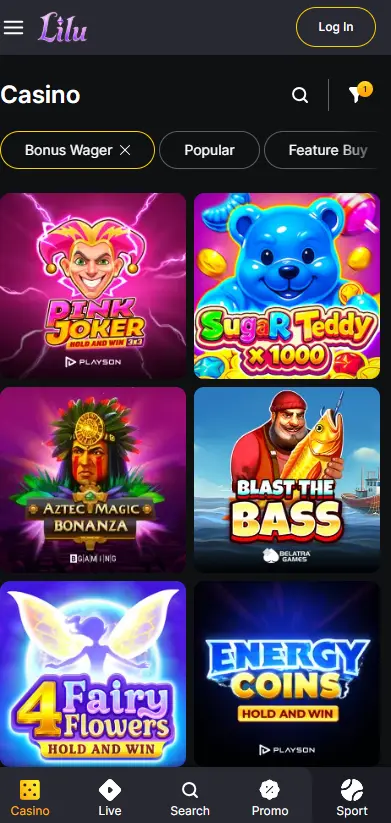
The core difference between the mobile PWA and the desktop browser version is layout and navigation, not content. The game lobby adapts to portrait orientation and touch input. Some Evolution Gaming live tables offer a Compact View mode specifically designed for smaller screens. Desktop-exclusive keyboard shortcuts do not apply on mobile, but all account management functions, including bonus activation, withdrawal requests, and KYC document uploads, are fully available.
Open lilu-casino.com in Chrome on your Android device. Chrome will either display an automatic Add to Home Screen prompt at the bottom of the viewport or you can trigger it manually from the browser’s three-dot menu and selecting Add to Home Screen. Confirm the action and the Lilu Casino shortcut will appear on your home screen. Tap it to launch the PWA in full-screen mode with no browser address bar visible.
Open lilu-casino.com in Safari on your iPhone or iPad. Tap the Share icon (the square with an upward-pointing arrow at the bottom of the Safari interface), scroll the share sheet, and select Add to Home Screen. Assign a name if prompted and tap Add. The shortcut appears on your home screen and opens in full-screen mode the same as an App Store application.
Lilu Casino does not currently publish a native APK for Android sideloading or a standalone application on Google Play or the App Store. The PWA provides an equivalent experience for the vast majority of players and requires no additional permissions beyond normal browser access.
The PWA runs on Android devices from version 8 upward using Chrome, and on iOS devices from iOS 14 upward using Safari. Older OS versions may display the site correctly in the browser but cannot install the PWA shortcut. A stable internet connection is recommended for Evolution Gaming live streams; slower connections will result in automatic quality reduction to maintain stream stability.
The full slot catalog loads in the mobile browser, including Megaways titles such as Lady Wolf Moon Megaways by BGaming, high-variance Nolimit City and Hacksaw Gaming releases, and progressive jackpot games. RTP values and volatility ratings are displayed on each game’s info panel. Demo mode is available for most slots without a real-money deposit.
Evolution Gaming tables including Lightning Roulette, Immersive Roulette, Crazy Time, and multiple Blackjack and Baccarat variants stream in the mobile browser. Ezugi contributes Andar Bahar and Teen Patti. Live streams adapt to your connection speed automatically.
Classic Roulette, Blackjack, and Baccarat in non-live RNG format from Pragmatic Play and NetEnt load instantly on mobile. Progressive jackpot titles from multiple providers are also present and display real-time jackpot counters.
All four stages of the welcome bonus pack are claimable from a mobile device. The first deposit bonus of 150% up to EUR/GBP 1250 plus 200 Free Spins on Wild Cash (BGaming) is accessible through the mobile Cashier. Free Spins credited to your account can be used on the corresponding game directly in the mobile browser. The x45 wagering requirement and 7-day validity apply regardless of which device you use. 18+ only.
The Monday Double Boost (100 Free Spins), Midweek Reload (50% up to EUR/GBP 500), Friday Magic Spins (75 Free Spins), and Weekend Power-Up (77% up to EUR/GBP 777 plus 77 FS) are all available and activatable from a mobile browser. All promotional offers require players to be 18 or older.
Every payment method supported on desktop is available in the mobile browser Cashier: Visa, Mastercard, Skrill, Neteller, MiFinity, Neosurf, Paysafecard, Bitcoin, Ethereum, Litecoin, Tether (USDT), Bitcoin Cash, and Ripple (XRP).
| Method | Deposit Min | Withdrawal Processing |
|---|---|---|
| Visa / Mastercard | EUR/GBP 20 | Standard banking timelines |
| Skrill / Neteller | EUR/GBP 20 | Typically 0-24 hours |
| Crypto (BTC, ETH, USDT) | EUR/GBP 20 | Network confirmation speed |
| Paysafecard / Neosurf | EUR/GBP 20 | Voucher-based; withdrawal via alternate method |
All payment data transmitted through the mobile browser is protected by TLS encryption. Cryptocurrency transactions are signed client-side and broadcast through standard blockchain network protocols. Lilu Casino does not store card numbers; payments are tokenized through PCI-DSS-compliant processing partners.
Navigate to lilu-casino.com in your mobile browser and tap the Registration button. Complete the sign-up form with your name, email address, date of birth, and preferred currency. An email verification link will be sent to confirm your address before withdrawal functionality is unlocked.
Enter your registered email address and password in the mobile login form. If two-factor authentication is enabled on your account, you will be prompted for the one-time code from your authenticator app. Biometric login options (Face ID, Touch ID, or Android fingerprint) can be configured through your device’s browser or PWA settings.
TLS encryption applies to every page and transaction at lilu-casino.com, including all mobile sessions. The certificate status is visible in your browser’s address bar.
2FA can be enabled from your account security settings on any device. Once active, every login requires both your password and a time-limited one-time code, significantly reducing the risk of unauthorized account access.
Modern Android and iOS devices allow biometric autofill for saved passwords through their native credential managers. Enabling this option on your device lets you authenticate with Face ID or a fingerprint instead of typing your password each time, combining convenience with a strong second authentication factor.
Our live chat is accessible from the mobile browser at any time, 24 hours a day, 7 days a week. Tap the chat icon on any page to connect with a support agent. For written queries, send an email to [email protected]. If gambling is causing concern, visit the Responsible Gaming page to set deposit limits, session time limits, or request a self-exclusion period directly from your mobile account settings.
Mobile App Questions
No. Lilu Casino does not have a listing on Google Play or the App Store. The PWA is installed directly from lilu-casino.com using your mobile browser's Add to Home Screen feature.
All slots from BGaming, Pragmatic Play, Play'n GO, NetEnt, and other integrated studios load in the mobile browser, as do live dealer tables from Evolution Gaming and Ezugi and sportsbook markets.
The PWA updates automatically in the background the next time you open it with an active internet connection. No manual reinstall or app store update is required.
Install and Start Playing
Grab 150% up to 1250 EUR and 200 free spins.
Start Playing Gambling involves risk and may be addictive. You must be 18 or older to play. Bonus terms and conditions apply.